
Routes by capability, not vendor
Agents ask for transcribe_audio, not a provider. plughive tries the free local backend, then each key you added, and the result says which one ran.
A gateway on your own machine for image, video, speech and web tools. It tries local backends first, then the paid APIs you add keys for.
npx plughiveThe package is not on npm yet. Use Docker or a source checkout for now.
[ -e .env ] || printf 'PLUGHIVE_ACCESS_KEY=%s\nPLUGHIVE_ADMIN_TOKEN=%s\nPLUGHIVE_SECRETS_PASSPHRASE=%s\n' \
  "$(openssl rand -hex 32)" "$(openssl rand -hex 32)" "$(openssl rand -hex 32)" > .env
docker compose up -d --build
docker compose exec plughive plughive dashboard --print
Writes three random secrets to .env, starts the container and prints a signed-in dashboard link.
pnpm build
cd app
npm install
npm run build
The tray app is built from a checkout for now. It is not signed yet.
git clone <repository-url> plughive
cd plughive
pnpm install --frozen-lockfile
pnpm build
node dist/src/cli.js start
Needs Node 22 and pnpm. Run it as a background service later with the service command.
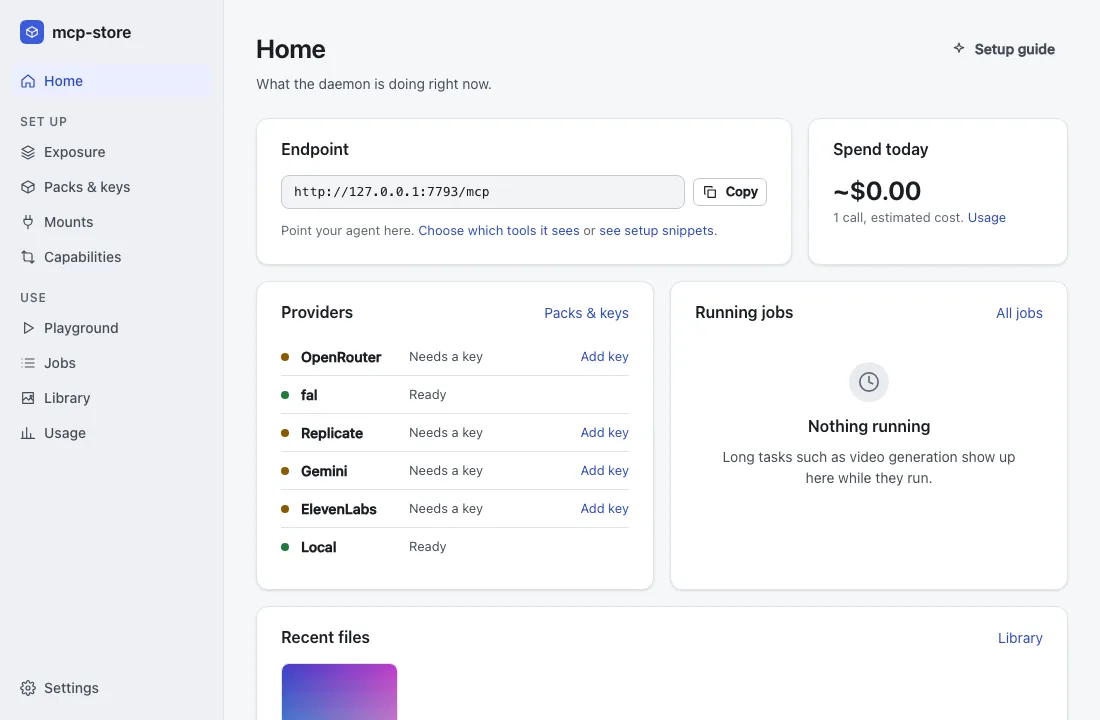
Agents connected
Spend today
Works with the agents you already use
Claude Code Claude Desktop Cursor Cx Codex H Hermes and any MCP clientEvery agent talks to one address. The gateway picks a backend for each call and tells you which one ran.
Point every client at the same local address. One access key covers them all.
Installed tools like ComfyUI, Ollama or whisper run first and cost nothing.
Paid APIs run only with keys you saved, inside the spend caps you set.
Pick a way to install above, or keep it running at login:
plughive service installThe CLI writes the entry for you and backs the file up once:
plughive connect claude-codeThis call needs no key:
curl -s http://127.0.0.1:7777/mcp \
  -H 'content-type: application/json' \
  -H 'accept: application/json, text/event-stream' \
  -H 'mcp-protocol-version: 2025-06-18' \
-d '{"jsonrpc":"2.0","id":1,"method":"tools/call","params":{"name":"search_tools","arguments":{"query":"image"}}}'The endpoint is http://127.0.0.1:7777/mcp. The snippets read the access key from your environment, so it never lands in a config file.
claude mcp add --transport http plughive http://127.0.0.1:7777/mcp \
--header "Authorization: Bearer $PLUGHIVE_ACCESS_KEY"{
"mcpServers": {
"plughive": {
"url": "http://127.0.0.1:7777/mcp",
"headers": {
"Authorization": "Bearer ${env:PLUGHIVE_ACCESS_KEY}"
}
}
}
}[mcp_servers.plughive]
url = "http://127.0.0.1:7777/mcp"
bearer_token_env_var = "PLUGHIVE_ACCESS_KEY"{
"mcpServers": {
"plughive": {
"command": "npx",
"args": [
"-y",
"mcp-remote@0.16.7",
"http://127.0.0.1:7777/mcp",
"--transport",
"http-only",
"--header",
"Authorization:${AUTH_HEADER}"
],
"env": {
"AUTH_HEADER": "Bearer <your access key>"
}
}
}
}mcp_servers:
plughive:
url: "http://127.0.0.1:7777/mcp"
headers:
Authorization: "Bearer <your access key>"Agents ask for transcribe_audio, not a provider. plughive tries the free local backend, then each key you added, and the result says which one ran.
Daily or monthly. When a cap is hit, the call is blocked or waits for your approval.
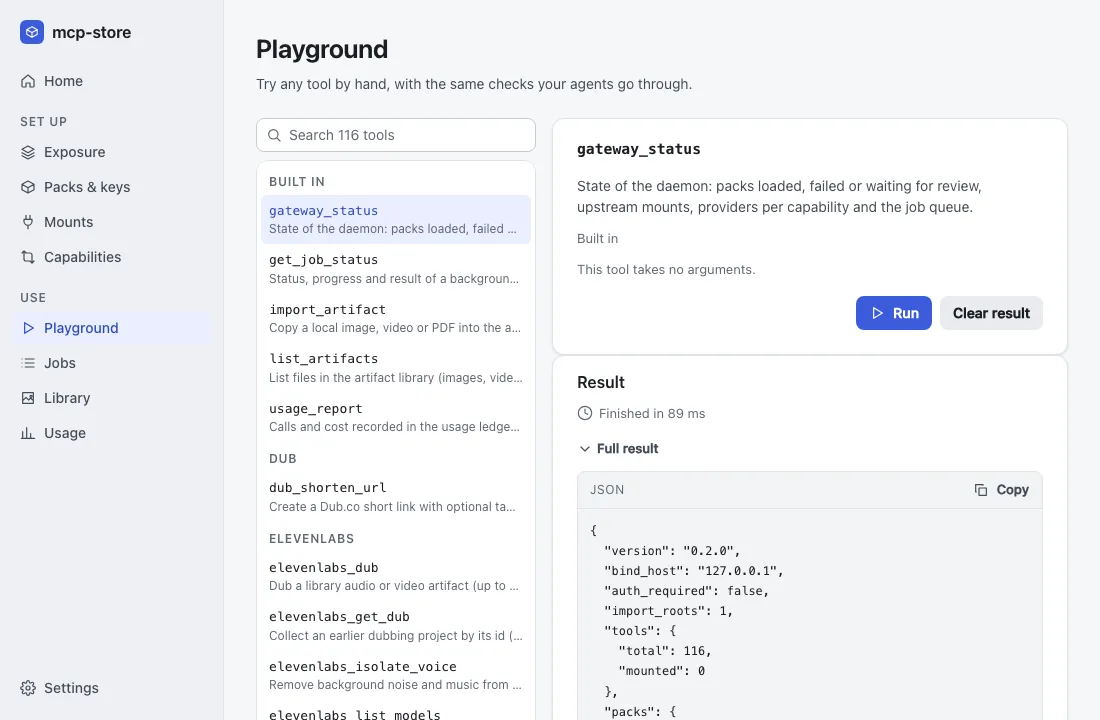
Every workflow takes dry_run. It lists each step, marks the paid ones and gives the most paid calls the run can make.
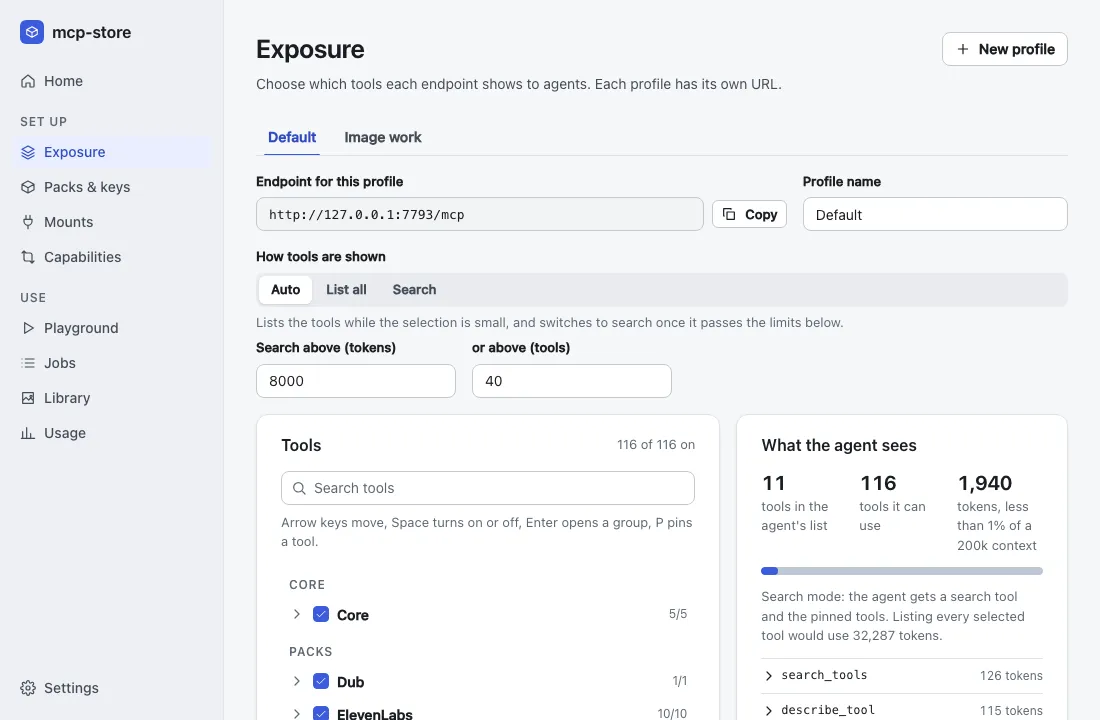
Give a client its own endpoint, such as http://127.0.0.1:7777/p/writer/mcp, and choose exactly which tools it sees.
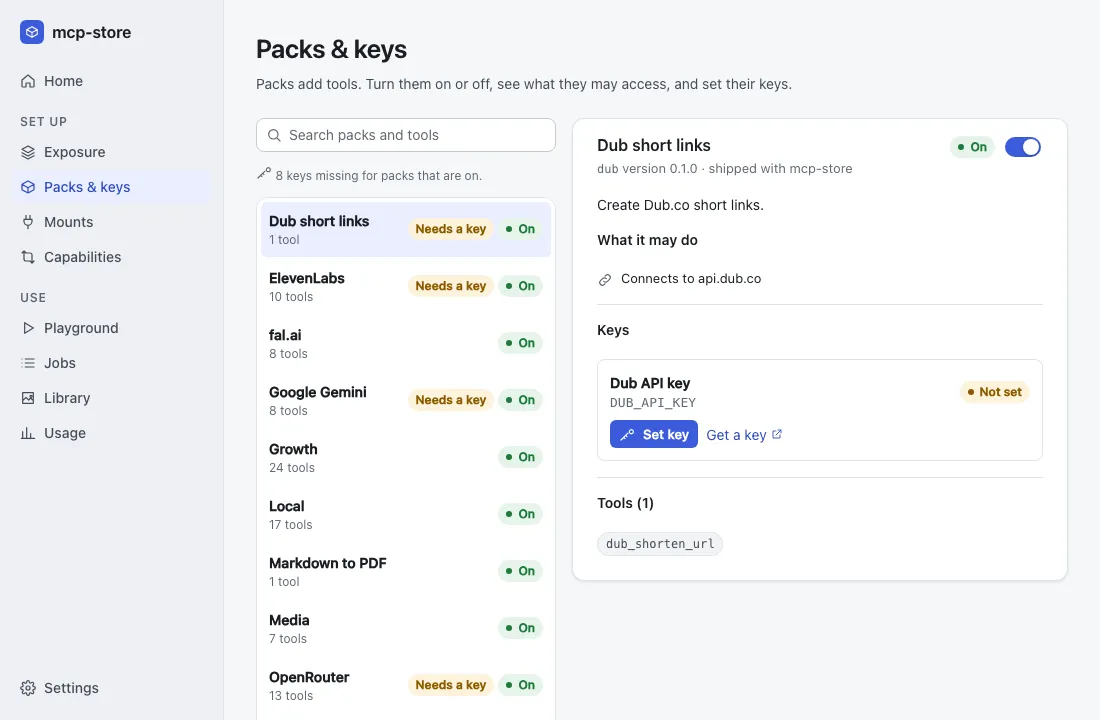
Notion, Linear, Sentry and more appear behind the same endpoint. Each stays off until you switch it on and sign in.
Images, audio and video land in a local library. Agents read them back as artifact:// resources.
37 packs shown
any one key apollo_bulk_enrich_people Deprecated alias of enrich_people (provider fixed to apollo).apollo_enrich_company Deprecated alias of enrich_company (provider fixed to apollo).apollo_enrich_person Deprecated alias of enrich_person (provider fixed to apollo).apollo_health_check Deprecated alias of leads_provider_status (provider fixed to apollo).apollo_search_companies Deprecated alias of find_companies (provider fixed to apollo).apollo_search_people Deprecated alias of find_people (provider fixed to apollo).craft_icp Convert a product description into a structured ICP (titles, seniorities, employee_ranges, locations, keywords) ready to feed find_people.draft_cold_email Draft a 3-touch cold email sequence for a person.enrich_company Enrich a company by domain with a lead provider.enrich_people Bulk person enrichment with a lead provider.enrich_person Enrich one person with a lead provider.find_companies Search companies with a lead provider.no key None. It runs on this machine.
None.
chat Send messages to a chat model through the best configured provider.clone_voice Create a reusable voice from library audio samples of one speaker.convert_document Convert a library document to another format (pdf, docx, html, md, ...) with the best configured provider (LibreOffice or pandoc locally).edit_image Edit a library image from a text instruction (change, add or remove things; optional mask and reference images) with the best configured provider.embed_text Turn texts into embedding vectors with the best configured provider.fetch_web Fetch a web page as clean Markdown (or text or HTML) with the best configured provider (a local browser, Jina or Firecrawl).generate_3d Generate a 3D model (GLB by default) from a text prompt, a library image, or both, with the best configured provider.generate_image Generate or edit images with the best configured provider.generate_music Generate music from a text prompt with the best configured provider.generate_sound_effect Generate a sound effect from a text description with the best configured provider.generate_speech Turn text into spoken audio with the best configured provider (voice and model are provider ids).generate_video Generate a short video clip with the best configured provider, optionally from a first and last frame (library image artifact ids).no key HF_TOKEN (optional) Get a key for Hugging Face token (whisperX speaker labels) None.
local_audio_concat Join two or more library audio files end to end with local ffmpeg (for example per-turn speech into one podcast track).local_audio_mix Mix a voice track with background music or effects using local ffmpeg: presets ad, narration, podcast, trailer (or custom), intro/outro padding, fades, sidechain ducking under the voice, voice cleanup and loudness normalisation to -14 LUFS / -1 dBTP.local_chat Chat with a model running in local Ollama.local_comfy_run_workflow Run an arbitrary API-format ComfyUI node graph (Save (API Format) JSON) on your ComfyUI server, wait for it and save every output image, video or audio file to the library.local_comfy_status Check the local ComfyUI server: version, GPU devices, queue length and installed checkpoints.local_contact_sheet Lay out library images (or the first frame of videos) on one grid image (a contact sheet) with local ffmpeg.local_embed Compute text embeddings with a local Ollama embedding model (for example nomic-embed-text).local_generate_image Generate images from a text prompt with local ComfyUI using a built-in txt2img workflow and an installed checkpoint (no API key).local_media_convert Transcode, trim, scale, reframe (fixed 9:16, 16:9 or 1:1 outputs), extract audio, make a GIF or take a thumbnail from a library video/audio artifact, using local ffmpeg.local_media_probe Inspect a library artifact with ffprobe: container, duration, size, and per-stream codec, resolution, frame rate, sample rate and channels.local_ollama_models List the models installed in the local Ollama server (name, size, family, quantization).local_speak Turn text (up to 5000 characters) into speech with local Kokoro and save it as an audio artifact.OPENROUTER_API_KEY openrouter_chat Chat completion through OpenRouter (/chat/completions) with any of its text models.openrouter_describe_model Show an OpenRouter model's kind, input schema (built from OpenRouter's catalog), pricing and a ready openrouter_run (or openrouter_chat) call.openrouter_elevenlabs_eleven_v3 Runs the OpenRouter speech model elevenlabs/eleven-v3.openrouter_generate_image Generate or edit images with an OpenRouter image model (default google/gemini-nano-banana-2.1).openrouter_generate_speech Turn text into speech with an OpenRouter speech model (default elevenlabs/eleven-v3).openrouter_generate_video Generate a video with an OpenRouter video model (default google/veo-3.1-fast).openrouter_google_gemini_nano_banana_2_1 Runs the OpenRouter image model google/gemini-nano-banana-2.1.openrouter_google_veo_3_1_fast Runs the OpenRouter video model google/veo-3.1-fast.openrouter_openai_gpt_image_2 Runs the OpenRouter image model openai/gpt-image-2.openrouter_run Run an OpenRouter video, image, speech or transcription model: {model, input}.openrouter_search_models Search OpenRouter's models.openrouter_transcribe Transcribe a library audio file with an OpenRouter speech-to-text model (default elevenlabs/scribe-v2).ELEVENLABS_API_KEY ELEVENLABS_API_KEY Get a key for ElevenLabs API key api.elevenlabs.io, storage.googleapis.com
elevenlabs_dub Dub a library audio or video artifact (up to 50 MB) into another language, keeping the speakers' voices.elevenlabs_get_dub Collect an earlier dubbing project by its id (for example after elevenlabs_dub timed out).elevenlabs_isolate_voice Remove background noise and music from a library audio or video artifact, keeping only the voice.elevenlabs_list_models List ElevenLabs speech models (cached 10 min) with language counts and text limits, plus this pack's defaults.elevenlabs_list_voices Search the voices available to this key.elevenlabs_music Compose music from a prompt (model music_v2_5), 3 to 600 seconds, optionally instrumental only.elevenlabs_sound_effect Generate a sound effect from a text description, 0.5 to 30 seconds.elevenlabs_text_to_speech Speak text with an ElevenLabs voice (default model eleven_multilingual_v2, up to 5000 characters).elevenlabs_transcribe Transcribe a library audio or video artifact (up to 50 MB) with Scribe.elevenlabs_usage Show the subscription tier, characters used and remaining, and when the quota resets.no key None. It runs on this machine.
None.
machine_add Register an existing SSH host as a machine.machine_add_repo Register (or replace, by name) a git checkout on a machine for machine_update_repo: the folder path on the machine, an optional branch, and an optional post_update shell command run in that folder after the pull (e.g.machine_get_file Download a regular file from a registered machine into the artifact library and return the new artifact.machine_put_file Upload an artifact from the library to a path on a registered machine (overwrites).machine_remove Unregister a machine and the repos registered on it.machine_remove_repo Unregister a repo by name.machine_run Run a shell command on a registered machine over SSH and return stdout, stderr and the exit code.machine_status Connect to a registered machine and report whether it is reachable, the round-trip time and `uname -srm`.machine_update_repo Update a registered repo on its machine: cd into the folder, `git pull --ff-only` (on the registered branch if any), then run its post_update command.machines_list List the registered machines (name, provider, user@host:port, auth method) and the repos registered on them.FAL_KEY FAL_KEY Get a key for fal.ai API key api.fal.ai, queue.fal.run, fal.media, *.fal.media
fal_describe_model Show a fal model's input JSON Schema, output fields, price and a ready-to-use fal_run call.fal_flux_dev Runs the fal model fal-ai/flux/dev (text-to-image).fal_get_result Collect the output of a fal job that was already submitted (for example after a timeout or a lost connection): {model, request_id}.fal_kling_video_v3_pro_image_to_video Runs the fal model fal-ai/kling-video/v3/pro/image-to-video (image-to-video).fal_minimax_speech_2_8_hd Runs the fal model fal-ai/minimax/speech-2.8-hd (text-to-speech).fal_nano_banana_pro Runs the fal model fal-ai/nano-banana-pro (text-to-image).fal_run Run any fal model through the queue: {model, input}.fal_search_models Search the fal.ai model catalog (1000+ image, video, audio, speech and 3D models).fal_train_lora Train a FLUX LoRA on fal (fal-ai/flux-lora-fast-training) from a zip of images: {images, trigger_word?, steps?, is_style?}.any one key BROWSERBASE_API_KEY (optional) Get a key for Browserbase API key STEEL_API_KEY (optional) Get a key for Steel API key api.browserbase.com, api.steel.dev
browserbase_close_session End a Browserbase session so it stops billing.browserbase_create_session Start a Browserbase cloud browser session (billed per minute until closed or timed out).browserbase_fetch Fetch a web page through Browserbase's Fetch API (no session needed) and return its content as markdown, raw HTML or JSON (capped at 200k characters).browserbase_get_session Status of a Browserbase session (RUNNING, COMPLETED, ERROR, TIMED_OUT) with its live view URL while it runs.steel_create_session Start a Steel cloud browser session (billed per minute until released or timed out).steel_navigate Open a URL in a running Steel session and wait for it to load.steel_release_session Release (end) a Steel session so it stops billing.steel_screenshot Take a PNG screenshot of the current page of a Steel session (after opening `url` when given) and save it to the artifact library.GEMINI_API_KEY GEMINI_API_KEY Get a key for Gemini API key generativelanguage.googleapis.com
gemini_chat Chat completion with a Gemini text model (default gemini-4-hydrogen; gemini-4-carbon for hard reasoning, gemini-3.5-flash-lite for cheap bulk).gemini_generate_image Generate or edit images with Gemini (Nano Banana).gemini_generate_music Generate music with Lyria.gemini_generate_speech Text to speech with Gemini TTS (default gemini-3.8-flash-tts, voice Kore).gemini_generate_video Generate a 3 to 15 second video with Gemini Omni (gemini-omni-1.2-flash).gemini_get_interaction Collect a Gemini video or music job by its interaction id (returned by gemini_generate_video / gemini_generate_music, or named in their timeout or cancel error).gemini_list_models List Gemini models from the live API (cached 10 min) plus the curated ids this pack defaults to per task (image, video, speech, music, transcribe, chat).gemini_transcribe Transcribe a library audio or video artifact (up to 15 MB) with gemini-3.5-transcribe.any one key E2B_API_KEY (optional) Get a key for E2B API key DAYTONA_API_KEY (optional) Get a key for Daytona API key api.e2b.app, *.e2b.app, app.daytona.io, proxy.app.daytona.io
docker_run Run a shell command in a throwaway local Docker container (needs docker installed).sandbox_create Start a cloud sandbox on E2B or Daytona (billed while it runs).sandbox_destroy Destroy a cloud sandbox and everything in it, ending its billing.sandbox_read_file Read a file from a cloud sandbox.sandbox_run_code Run a Python or JavaScript snippet in a cloud sandbox and return its exit code and output.sandbox_run_command Run a shell command in a cloud sandbox and return its exit code and output (each capped at 100k characters).sandbox_write_file Write a file into a cloud sandbox, from text `content` or from a library artifact (`artifact_id`).no key None. It runs on this machine.
None.
wf_brand_kit_from_url A brand kit from a website: a screenshot (local headless browser) and the page text (Firecrawl, when set up) are read side by side, a model drafts the kit (name, tagline, voice, colors, fonts, logo direction) and it is saved to the library as JSON and as a Markdown brand sheet.wf_dub_localize Localize a video or audio file into 1 to 5 languages.wf_issue_triage Triage one bug report or feature request: type, severity, suggested labels and components, missing information, next steps and a draft reply.wf_podcast_produce A podcast episode from a topic and notes: a model writes the script (one host, or a two-host conversation) and the show notes, text-to-speech reads it, and the show notes are saved as a Markdown document.wf_video_launch_film_16x9 A 16:9 product launch film in five beats (hook, problem, solution, proof, call to action): a model writes the beats from your product notes (and the product page, when you give a URL and Firecrawl is set up), each beat becomes a generated clip, the clips are joined and a voice-over is laid on top.wf_video_narrated_ad A narrated ad, script first: a model writes 2 to 6 script lines, each with the visual it plays over; one voice reads the whole script, each visual becomes a generated clip in the aspect you pick, and the clips are joined under the voice.wf_video_short_9x16 A 9:16 short (Reels, Shorts, TikTok) from a topic: a model plans 2 to 8 shots with narration, each shot is generated as a video clip, the clips are joined, a voice-over reads the narration and captions are burned in locally.REPLICATE_API_TOKEN REPLICATE_API_TOKEN Get a key for Replicate API token api.replicate.com, replicate.delivery, *.replicate.delivery
replicate_describe_model Show a Replicate model's input JSON Schema, output shape, version and a ready-to-use replicate_run call.replicate_get_result Collect the output of a Replicate prediction that was already created (for example after a timeout or a lost connection): {prediction_id}.replicate_get_training Check a Replicate training that was already started (for example after a timeout): {training_id}.replicate_run Run any Replicate model: {model, input}.replicate_search_models Search Replicate's public models by text, or list a curated collection (for example text-to-image, text-to-video or text-to-speech).replicate_train_lora Train a LoRA on Replicate from a zip of images into a model you own: {images, destination, trigger_word?, steps?}.any one key RESEND_API_KEY (optional) Get a key for Resend API key AGENTMAIL_API_KEY (optional) Get a key for AgentMail API key api.resend.com, api.agentmail.to
agentmail_get_message Read one AgentMail message: headers, text and HTML body (each capped at 100k characters), plus `extracted_text` (the reply without quoted history) when AgentMail provides it.agentmail_list_inboxes List the AgentMail inboxes on the account: inbox id, address and display name.agentmail_list_messages List messages in an AgentMail inbox, newest first: ids, sender, subject, preview and labels.agentmail_reply Reply to an AgentMail message from its inbox (sends an email).resend_send_email Send an email through Resend.any one key GOOGLE_MAPS_API_KEY (optional) Get a key for Google Maps Platform API key MAPBOX_ACCESS_TOKEN (optional) Get a key for Mapbox access token maps.googleapis.com, places.googleapis.com, routes.googleapis.com, api.mapbox.com
google_directions Route between two addresses with the Google Routes API: distance, duration and turn-by-turn steps.google_geocode Turn an address or place name into coordinates with the Google Geocoding API.google_places_search Search places by text ("pizza in Lisbon", "Eiffel Tower") with Google Places Text Search.mapbox_directions Route through 2 to 25 points (longitude, latitude) with Mapbox Directions: distance, duration and turn-by-turn steps.mapbox_geocode Turn an address or place name into coordinates with Mapbox Geocoding v6.no key None. It runs on this machine.
None.
forget Delete memories.list_memories Page through the memories in a collection, newest first, optionally only those carrying every given tag.list_memory_collections List memory collections with their memory counts and the embedding provider, model and dimensions each is pinned to, plus the search mode in use (sqlite-vec index or brute-force JS fallback).recall Search long-term memory by meaning: returns the stored texts closest to `query` in a collection, best first, with a cosine similarity score (1 is identical).remember Store text in long-term semantic memory so it can be found later by meaning with recall.DATAFORSEO_LOGIN + DATAFORSEO_PASSWORD DATAFORSEO_LOGIN Get a key for DataForSEO API login DATAFORSEO_PASSWORD Get a key for DataForSEO API password api.dataforseo.com
seo_backlinks Backlink summary (domain rank, total links, referring domains, spam score) for a target.seo_keyword_volume Search volume + CPC + competition for a list of keywords (DataForSEO Google Ads).seo_keywords_for_site Keywords related to a domain (DataForSEO Google Ads keywords-for-site).seo_onpage Instant on-page SEO audit via DataForSEO.seo_serp Live Google SERP via DataForSEO.any one key FIRECRAWL_API_KEY (optional) Get a key for Firecrawl API key api.firecrawl.dev
firecrawl_crawl Async multi-page crawl via Firecrawl v2 (submit + poll).firecrawl_map Discover URLs on a domain via Firecrawl v2.firecrawl_scrape Scrape one URL via Firecrawl v2.firecrawl_search Web search via Firecrawl v2.screenshot_url Capture a screenshot of a URL via headless chromium (Playwright).CALCOM_API_KEY calcom_cancel_booking Cancel a Cal.com booking by its uid.calcom_create_booking Book a Cal.com event type at `start` (an ISO time, ideally one returned by calcom_get_availability) for an attendee.calcom_get_availability Free slots of a Cal.com event type between `start` and `end` (dates or ISO times), grouped by day in `time_zone`.calcom_list_event_types List the Cal.com event types of the account (or of `username`): id, title, slug, length in minutes and whether each is hidden.any one key POLYGON_API_KEY (optional) Get a key for Massive (Polygon.io) API key ALPHAVANTAGE_API_KEY (optional) Get a key for Alpha Vantage API key api.massive.com, www.alphavantage.co
alphavantage_daily Daily open, high, low, close and volume for a symbol from Alpha Vantage (TIME_SERIES_DAILY), newest first, up to `days` days (max 100).alphavantage_quote Latest price, change, volume and previous close for a symbol from Alpha Vantage (GLOBAL_QUOTE).polygon_aggregates Price bars (OHLCV) for a ticker over a date range from Massive (formerly Polygon.io), e.g.polygon_previous_close Previous trading day's open, high, low, close and volume for a ticker from Massive (formerly Polygon.io).any one key TWILIO_ACCOUNT_SID (optional) Get a key for Twilio Account SID TWILIO_AUTH_TOKEN (optional) Get a key for Twilio auth token VAPI_API_KEY (optional) Get a key for Vapi private API key api.twilio.com, api.vapi.ai
twilio_list_messages List recent Twilio messages on the account, newest first, optionally filtered by recipient, sender or the day sent (YYYY-MM-DD, UTC).twilio_send_sms Send a text message (SMS) through Twilio.vapi_create_call Place an outbound phone call with a Vapi assistant to `customer_number`.vapi_get_call Status of a Vapi call: queued, ringing, in-progress, forwarding or ended, with the end reason, cost, transcript and summary once it has ended.any one key PEXELS_API_KEY (optional) Get a key for Pexels API key UNSPLASH_ACCESS_KEY (optional) Get a key for Unsplash access key FREESOUND_API_KEY (optional) Get a key for Freesound API key api.pexels.com, images.pexels.com, videos.pexels.com, static-videos.pexels.com, player.vimeo.com, api.unsplash.com, images.unsplash.com, freesound.org, cdn.freesound.org
freesound_search Search Freesound sound effects and recordings.pexels_search Search Pexels free stock photos or videos.stock_download Download a Pexels photo or video, an Unsplash photo, or a Freesound preview (high-quality MP3) into the artifact library.unsplash_search Search Unsplash free photos.no key None. It runs on this machine.
None.
ask_agent_cli Ask an installed agent CLI (claude, codex, gemini, agy, opencode, copilot) one question in non-interactive mode, using the account it is signed in with, and return its answer {text, usage?, session_id?}.generate_image_via_agy Generate an image with the Antigravity CLI's (agy) built-in image tool, using the Google account agy is signed in with, and save it to the artifact library.list_agent_clis List the agent CLIs this pack can drive (claude, codex, gemini, agy, opencode, copilot): whether each is installed on the daemon's PATH, its version, and whether it is signed in where the CLI itself reports that (claude, codex; null otherwise).AYRSHARE_API_KEY AYRSHARE_API_KEY Get a key for Ayrshare API key AYRSHARE_PROFILE_KEY (optional) Get a key for Ayrshare profile key (optional, Business plan user profiles) api.ayrshare.com
ayrshare_delete_post Delete a post published or scheduled through Ayrshare, from every network it went to.ayrshare_history List posts sent through Ayrshare, newest first: id, text, platforms, status, schedule and each network's post URL.ayrshare_post Publish (or schedule with `schedule_date`) a post to the social accounts linked in Ayrshare.any one key X402_PRIVATE_KEY (optional) Get a key for x402 wallet private key (a small, dedicated wallet) *
x402_fetch Fetch an x402 paid URL and pay for it in USDC from the pack's wallet: sends the request, and when it answers 402 picks the cheapest option this pack can pay (exact scheme, USDC on an allowed network) that costs at most max_usd and fits the pack's per-call and 24-hour limits, signs the payment and sends the request again with it.x402_quote Ask an x402 paid URL what it costs, without paying: sends the request with no payment and, when it answers 402 Payment Required, lists each payment option with its price in USD, network, recipient and whether this pack could pay it (and why not).x402_wallet Show the x402 wallet: its address (never the key), the networks and limits in force, what was paid in the last 24 hours and the most recent payments.SHARE_S3_ACCESS_KEY_ID + SHARE_S3_SECRET_ACCESS_KEY SHARE_S3_ACCESS_KEY_ID Get a key for R2/S3 access key ID SHARE_S3_SECRET_ACCESS_KEY Get a key for R2/S3 secret access key *.r2.cloudflarestorage.com, *.amazonaws.com
share_artifact Publish a library artifact as a public link that expires: uploads it to the configured R2/S3 bucket and returns a presigned download URL.share_unshare Delete an artifact's shared copy from the R2/S3 bucket, so its links stop working at once.DUB_API_KEY dub_shorten_url Create a Dub.co short link with optional tags.no key None. It runs on this machine.
None.
md_to_pdf Render markdown to PDF via pandoc.TELEGRAM_BOT_TOKEN send_telegram Send a Telegram message to the default chat or a chat in the pack's allowedChatIds setting.BRAVE_API_KEY Adds a backend to the shared tools, so an agent's existing calls can run on it.
DEEPL_API_KEY Adds a backend to the shared tools, so an agent's existing calls can run on it.
EXA_API_KEY Adds a backend to the shared tools, so an agent's existing calls can run on it.
JINA_API_KEY Adds a backend to the shared tools, so an agent's existing calls can run on it.
MISTRAL_API_KEY Adds a backend to the shared tools, so an agent's existing calls can run on it.
PARALLEL_API_KEY Adds a backend to the shared tools, so an agent's existing calls can run on it.
any one key FIRECRAWL_API_KEY (optional) Get a key for Firecrawl API key EXA_API_KEY (optional) Get a key for Exa API key BROWSERBASE_API_KEY (optional) Get a key for Browserbase API key TAVILY_API_KEY (optional) Get a key for Tavily API key PERPLEXITY_API_KEY (optional) Get a key for Perplexity API key JINA_API_KEY (optional) Get a key for Jina AI API key APIFY_TOKEN (optional) Get a key for Apify API token GITHUB_MCP_PAT (optional) Get a key for GitHub personal access token LINEAR_API_KEY (optional) Get a key for Linear API key CONTEXT7_API_KEY (optional) Get a key for Context7 API key RUNPOD_API_KEY (optional) Get a key for Runpod API key HF_TOKEN (optional) Get a key for Hugging Face token None.
Adds a backend to the shared tools, so an agent's existing calls can run on it.
SUPADATA_API_KEY Adds a backend to the shared tools, so an agent's existing calls can run on it.
TAVILY_API_KEY Adds a backend to the shared tools, so an agent's existing calls can run on it.
No pack matches. Try another word or filter.
Each one runs local steps for free and caps its paid calls. Ask for a dry run and see every step first.
brand_kit_from_url dub_localize issue_triage podcast_produce video_launch_film_16x9 video_narrated_ad video_short_9x16 {
"steps": [
{ "shot", "screenshot_url", local },
{ "page", "firecrawl_scrape", paid },
{ "kit", "chat", paid },
{ "images", "generate_image", paid }
],
"paid_calls_max": 4
}
Keys live in your system's secret store and calls start on your machine. Paid APIs see a request only when you added their key.
Binds 127.0.0.1 and checks Host and Origin, so web pages cannot reach it.
macOS Keychain or the OS keyring. Never returned by the API, masked in logs.
A pack reaches only the hosts it declares. Cloud metadata is always blocked.
Spend approvals are admin-only, cover one call and expire.
The daemon makes no network calls of its own. None.
plughive pack add ./hello-pack
export default (api) => {
  const { z, definePack, defineTool } = api;

  const greet = defineTool({
    name: "hello_greet",
    description: "Return a greeting for a name. Needs no key and saves nothing.",
    annotations: { readOnlyHint: true },
    input: z.object({
      name: z.string().trim().min(1).max(80).describe("Who to greet."),
    }),
    run({ name }) {
      return { greeting: `Hello, ${name}!` };
    },
  });

  return definePack({ tools: [greet, saveNote] });
};A local MCP server that bundles image, video, speech, web and messaging tools behind one endpoint, so you set them up once for every agent.
No telemetry. The daemon makes no network calls of its own. Traffic leaves your machine only for tools you call and servers you mount, and each pack can reach only the hosts it lists.
plughive is free and Apache-2.0. Paid APIs bill you directly on your own keys. Local backends cost nothing, and spend caps stop a run from going over.
No. The no-key packs (ffmpeg tools, PDF, memory, workflows in dry-run) work out of the box. Add a key such as fal or ElevenLabs when you want generation.
Any client that speaks MCP over HTTP. plughive connect writes the entry for Claude Code, Cursor, Codex, Claude Desktop and Hermes, and backs the file up first.
Yes. A pack is a folder with a pack.json and a script. Install it with plughive pack add ./my-pack. It gets only the keys and hosts you grant.
macOS, Linux and Windows with Node 22 or later, or anywhere Docker runs. It can install itself as a login service on all three.
It binds 127.0.0.1 by default. To expose it, set an access key, put it behind a TLS proxy and set the public URL. The security doc covers the details.